
AI Workflow Automation for Marketing Agencies (Case Study: Save 10–15 Hours/Week)
Introduction
Most marketing agencies don’t realize how much time they’re losing every week.
Not on strategy. Not on client communication.
👉 But on repetitive operational work.
Things like:
- Pulling campaign data
- Analyzing performance
- Creating reports
- Sending updates
For a growing agency, this becomes:
👉 10–15+ hours every single week
And the worst part?
👉 It repeats every week.
This is not a workload problem. It’s a workflow problem. This is exactly where AI workflow automation creates real impact-not as a tool, but as a system.
In this guide, you’ll see:
- A real AI workflow implementation (case study)
- Where agencies actually save time
- Step-by-step workflow setup
- Exact time + cost impact
⚠️ What Most Agencies Get Wrong About AI Automation
Before the case study-this matters. Most agencies fail with AI because:
1. They use tools without workflows
2. They automate random tasks
3. They don’t structure data
4. They expect instant results
👉 That’s why nothing changes operationally.
AI only works when applied as a system-not a tool.
📊 Real Example of AI Workflow Automation (Agency Case Study)
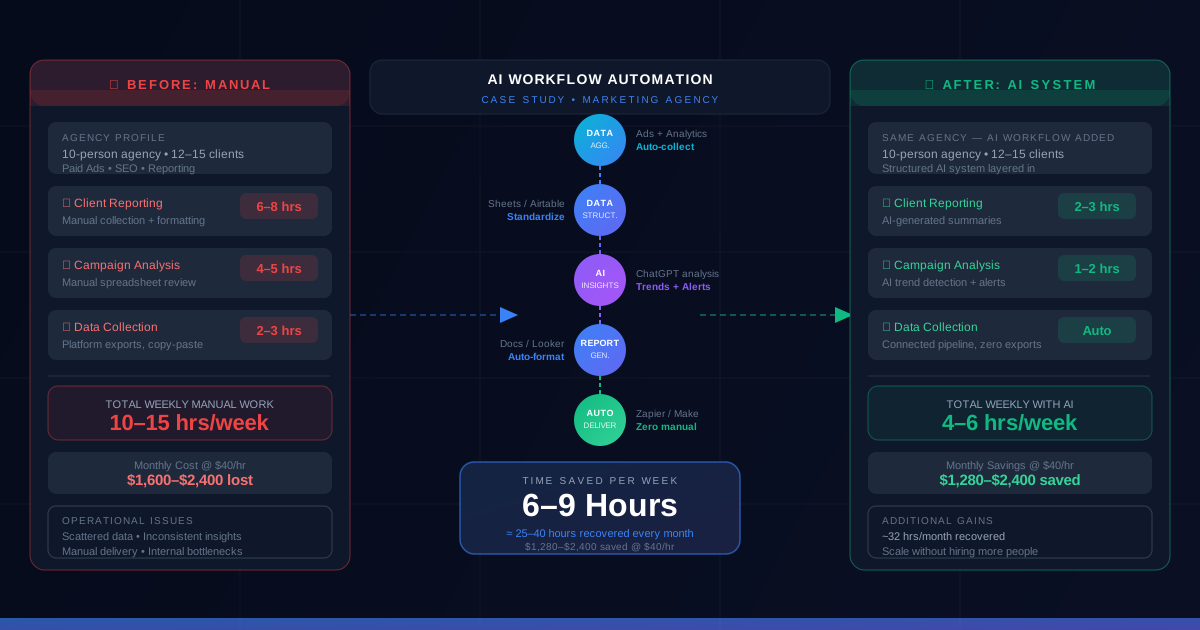
Agency Profile
- 10-person digital marketing agency
- 12–15 active clients
- Services: paid ads, SEO, reporting
Problem
The agency was spending:
- 6–8 hrs/week → reporting
- 4–5 hrs/week → campaign analysis
👉 Total: 10–13 hours/week
Operational Issues
- Data scattered across platforms
- Manual report creation
- Inconsistent insights
- Delays in delivery
👉 This created internal bottlenecks-not just time loss.
🚀 AI Workflow Implementation (What They Actually Did)
They didn’t “use AI tools randomly.” They built a structured workflow system:
1. Automated data collection (ads + analytics)
2. Centralized data pipeline
3. AI-generated insights
4. Automated report creation
5. Scheduled delivery
👉 This is what most agencies miss: sequence + system
📉 Before vs After (Real Impact)
| Task | Before | After AI | Time Saved |
|---|---|---|---|
| Reporting | 6–8 hrs | 2–3 hrs | ~65% |
| Analysis | 4–5 hrs | 1–2 hrs | ~60% |
| Data Collection | 2–3 hrs | Automated | ~100% |
👉 Total: 10–13 hrs → 4 hrs/week
👉 6–9 hours saved every week
📈 Where Time Actually Gets Saved
Before AI
| Task | Weekly Time |
|---|---|
| Reporting | 6–8 hrs |
| Analysis | 4–5 hrs |
| Data Collection | 2–3 hrs |
| Total | 10–15 hrs |
After AI Workflow
| Task | Weekly Time |
|---|---|
| Reporting | 2–3 hrs |
| Analysis | 1–2 hrs |
| Data Collection | Automated |
| Total | 4–6 hrs |
👉 Weekly savings: 6–10 hours
👉 Monthly savings: 25–40 hours
🧠 Key Insight (This Is What Actually Matters)
👉 The agency didn’t hire more people
👉 They didn’t switch tools aggressively
They simply:
👉 Converted manual workflows into AI systems
That’s the difference between "using AI" vs "operating with AI".
Step-by-Step AI Workflow Implementation (Used by Agencies)
Step 1: Identify Repetitive Tasks
Start with:
- Reporting
- Campaign analysis
- Lead handling
👉 These are highest ROI workflows.
Step 2: Map the Workflow
Example: Data → Analysis → Insights → Report → Delivery
👉 If this isn’t clear, automation fails.
Step 3: Set Up Data Aggregation
Connect ad platforms, analytics tools, and CRM.
👉 Outcome: eliminates manual data pulling.
Step 4: Apply AI for Insights
AI generates summaries, trends, and anomalies.
👉 Outcome: removes manual analysis work.
Step 5: Automate Reporting
Use structured templates (docs, dashboards, reports).
👉 Outcome: removes formatting + duplication.
Step 6: Automate Delivery
Scheduled emails and live dashboards.
👉 Outcome: zero manual sending.
💰 ROI Breakdown (This Drives Decisions)
Time Saved
👉 ~8 hours/week
Monthly Impact
👉 ~32 hours/month
Cost Impact
At $20/hour: 👉 $640/month saved
At $40/hour: 👉 $1,280/month saved
Additional Gains
- Faster reporting cycles
- Improved client experience
- Higher team efficiency
⚠️ Common Mistakes Agencies Make
- Using tools without workflows
- Over-automating too early
- Not tracking ROI
- Poor implementation structure
👉 The problem is never tools-it’s execution.
🧩 How to Start Implementing AI Workflows
1. Identify repetitive work
2. Map workflow clearly
3. Apply AI step-by-step
4. Test with one client
5. Scale across accounts
👉 Start simple. Scale systematically.
📋 AI Workflow Checklist
- [ ] Identify time-consuming tasks
- [ ] Map workflows
- [ ] Choose tools
- [ ] Apply AI
- [ ] Automate reporting
- [ ] Measure ROI
FAQ
🚀 Stop Wasting 10+ Hours Every Week
Most agencies are still stuck doing:
❌ manual reporting
❌ manual analysis
❌ repetitive operational work
👉 That costs 10–20 hours every week
We help agencies:
- Build AI workflows
- Automate operations
- Reduce manual work
👉 Get your AI workflow setup for $199