
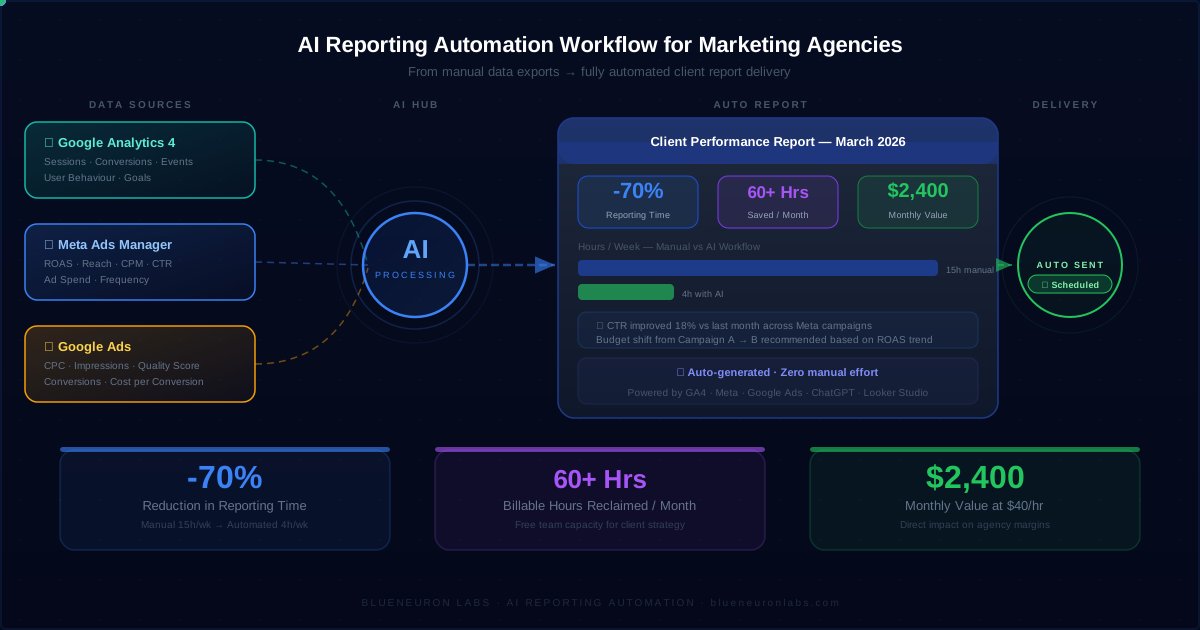
How Marketing Agencies Reduce Reporting Time by 70% Using AI (Step-by-Step Workflow)
Introduction
Most marketing agencies spend 6-10 hours every week on client reporting.
Collecting data. Analyzing performance. Creating reports. Sending updates.
It adds up quickly.
👉 The problem is not reporting. It’s the manual workflow behind it.
👉 The opportunity: reduce reporting time by 70% without hiring more people.
This guide shows how marketing agencies reduce reporting time by 70% using AI workflows - step by step.
⏱️ How Much Time Agencies Waste on Reporting
Most agencies underestimate how much time reporting actually consumes.
Typical breakdown:
- Data collection: 2-3 hours
- Analysis: 3-4 hours
- Report creation: 2-3 hours
👉 Total: 6-10 hours per week per client
With AI:
👉 Reduced to 2-3 hours total
Now multiply that across multiple clients - and reporting quickly becomes a major operational bottleneck.
⚠️ Why Most Agencies Fail at Reporting Automation
Most agencies try to automate reporting-but fail.
Why?
1. They use tools without workflows
2. They don’t structure data properly
3. They expect instant automation
👉 That’s why reporting still feels manual.
Automation without systemization doesn’t work.
Before vs After: Manual vs AI Reporting Workflow
| Task | Manual Time | AI Time |
|---|---|---|
| Data Collection | 2-3 hrs | 10-15 min |
| Analysis | 3-4 hrs | 30-45 min |
| Report Creation | 2-3 hrs | 20-30 min |
| Delivery | 30 min | Automated |
👉 Total: 6-10 hrs → 2-3 hrs
This is where agencies unlock real efficiency.
Step-by-Step AI Reporting Workflow (Used by Agencies)
This is the exact system used by high-performing agencies.
Step 1: Data Aggregation
What happens: Data is collected automatically from all platforms.
Sources include:
- Google Analytics (GA4)
- Google Ads, Meta Ads
- CRM systems
Tools: Supermetrics, GA4
Benefit: Eliminates manual exports
👉 Outcome: Saves 2-3 hours per week
Step 2: Data Structuring
What happens: Data is standardized into a consistent format.
How:
- Google Sheets
- Airtable
- Central dashboards
Benefit: Reduces errors and prepares data for automation
👉 Outcome: Saves 1-2 hours per week
Step 3: AI Insight Generation
What happens: AI analyzes performance and generates insights.
Examples:
- Campaign summaries
- Trend detection
- Anomaly alerts
Tools: ChatGPT
Benefit: Eliminates manual analysis
👉 Outcome: Saves 2-3 hours per week
Step 4: Report Generation
What happens: Reports are automatically created.
Formats:
- Google Docs
- Notion
- Looker Studio
Benefit: Standardizes reporting and removes formatting work
👉 Outcome: Saves 1-2 hours per week
Step 5: Automated Delivery
What happens: Reports are sent automatically.
Methods:
- Scheduled emails
- Live dashboards
Tools: Zapier, Make
Benefit: Ensures consistency and removes manual effort
👉 Outcome: Saves 30-60 minutes per week
📊 Real Example: Reporting Workflow in Action
A 10-person agency managing 12 clients:
- Before: 60+ hours/month on reporting
- After AI: 15-20 hours/month
👉 Saved: 40+ hours/month
That’s nearly one full-time role worth of time recovered.
Tools Used in Reporting Automation
Map tools to workflow (not randomly):
| Workflow Step | Tools |
|---|---|
| Data Aggregation | GA4, Ads Platforms, Supermetrics |
| Data Structuring | Google Sheets, Airtable |
| AI Insights | ChatGPT |
| Report Creation | Docs, Notion, Looker Studio |
| Delivery | Zapier, Make |
👉 Explore more:
- Best AI Tools for Marketing Agencies in 2026
- How AI Can Automate Client Reporting in Marketing Agencies
- How to Build an AI System for Your Marketing Agency
- How Marketing Agencies Can Save 20+ Hours Per Week Using AI Workflows
- AI Workflow Automation for Marketing Agencies
ROI Breakdown
Let’s quantify the impact.
- Before: 40-60 hours/month
- After: 12-20 hours/month
- Time Saved: 40+ hours/month
At $40/hour:
👉 $1,600-$2,400/month saved
This is why AI reporting automation becomes a high-ROI investment.
Common Mistakes Agencies Make
- Using tools without workflows
- No integration between systems
- No structured AI prompts
- Expecting instant automation
👉 The difference is not tools. It’s execution and system design.
How to Implement This in Your Agency
1. Identify your reporting workflow
2. Map inputs and outputs
3. Build automation step-by-step
4. Test with one client
5. Scale gradually
👉 Start with: AI Readiness Assessment
Reporting Automation Checklist
- [ ] Identify repetitive reporting tasks
- [ ] Collect all data sources
- [ ] Structure data centrally
- [ ] Apply AI insights
- [ ] Automate delivery
Frequently Asked Questions
👉 Related: AI Workflow Automation for Marketing Agencies · Best AI Tools for Marketing Agencies in 2026
🚀 Stop Spending 10+ Hours on Reporting Every Week
Most agencies don’t realize how much time reporting consumes until they automate it.
We build custom AI workflows designed for marketing agencies.
👉 Save 15-25 hours/week
👉 Standardize reporting
👉 Scale without hiring
👉 Get your AI workflow built for $199